KidDOS: A Computer Small Enough for a Kid to Explore
I learned to program because I was bored in front of a 486DX4 with 8 megs of RAM and a 160 MB drive. Kids today can't have that. So I want to build it.
I started programming because I was bored.
Not “I wanted to change the world” bored. Not “I read a book about Turing” bored. Just plain, twelve-year-old, nothing-to-do bored, sitting in front of a 486DX4 — 100 MHz, eight megabytes of RAM, a 160-megabyte hard drive.
It had games. Good ones. Day of the Tentacle. Warcraft II: Tides of Darkness. Dune II. Master of Orion. Z. The Lost Vikings. Dyna Blaster. And one totally bootleg CD somebody bought somewhere, with “Hundreds of Awesome Games” printed on it in a font that had never met a designer.
But man. I had played all of those. Many, many times. I knew every mission in Warcraft II by heart. I had conquered Arrakis with every house. The bootleg CD had been mined down to the last barely-working shareware demo. There was no internet. There was a blinking cursor.
Meanwhile, my friends were getting newer and newer computers. My father was not much of an upgrades guy. So while my schoolmates were playing Half-Life and Red Alert 2, I was getting a 16-megabyte RAM upgrade that significantly improved the performance of my Windows 95. That was the state of the art in my house.
So I started poking at the thing.
dir. Okay, files. cd. Okay, folders. What’s in autoexec.bat? Why does the computer say that stuff when it boots? What happens if I change it? (The computer stops booting. And now, at twelve years old, you learn how to quickly fix the ONLY computer in the house before your father comes home from work. Jesus. Talk about necessity. Backups? Never heard of them.) What’s debug.exe? Why is there a qbasic.exe sitting right there, and what does it do?
And then somebody handed me a book. The first programming book I ever owned was Kip Irvine’s Assembly Language for Intel-Based Computers, third edition. Not Pascal, not BASIC, not “Learn C in 21 Days” — assembly. Registers, interrupts, int 21h, MASM. On that machine, it made perfect sense: there wasn’t much between me and the metal, so why not start at the metal? (I’ve written about that first language before.)
Here’s the thing people forget: that was possible. A hundred and sixty megabytes. A single human being could sit down and read everything on that computer. Every file had a reason to exist. Every directory was put there by a person, and you could figure out why. Config files were text. Executables were small enough to open in a hex viewer and stare at. The whole machine was a finite, knowable object, and a bored kid could map it out the same way you’d map out the woods behind your house.
That is how I became a programmer. Not through a course. Through boredom, a machine that was too slow for the new games, and a book that happened to be about assembly.
You can’t do that anymore
Sit a kid in front of a modern computer and tell them to explore it.
Windows is a bloated advertising platform that occasionally runs programs. The Start menu tries to sell you things. The file system is a maze of AppData\Local\Packages\Microsoft.Something_8wekyb3d8bbwe that no human wrote and no human understands. Open any folder in C:\Windows and you will find ten thousand files with no explanation, and touching any of them is a good way to reinstall the OS.
Linux is better, but it’s not the Linux I explored twenty-five years ago either. Every time I look, something has moved. /etc shed half its contents into /usr/lib. ifconfig is gone. init became a dozen unit files. Every distro has its own opinion about where things go, and that opinion changes with the release cycle. A grown sysadmin keeps up. A ten-year-old does not.
macOS hides the file system entirely and would prefer you didn’t ask.
And all three of them come with an inhumane number of interfaces. A modern OS has more configuration surface than any single person can read in a lifetime. There is no “read everything and understand it” anymore. There is only “search for the error message and hope.”
So what does the bored kid do? He doesn’t explore the computer. There’s nothing to explore. He opens the browser, and the browser hands him an infinite feed of short videos, and that feed is engineered by very smart people to make sure he never gets bored again.
And boredom was the whole point. Boredom is what made me open autoexec.bat.
So here’s what I want to build
Hear me out.
KidDOS. A fake computer inside your real computer.
It’s a single application. Runs on Mac, Windows, Linux. When you launch it, it goes fullscreen, hides everything else, and shows you a CRT-looking terminal with a blinking cursor. That’s it. No windows, no mouse, no internet. Just the prompt.
The kid types hi. The machine says hi back. Then it says: type help if you want to know what I can do.
kidos:~$ hi
Hi! I'm a computer. I'm small, and you can learn all of me.
Type help if you want to know what I can do.

kidos:~$ help
You're in a folder called /home/kid. Folders hold files.
  ls      - show what's in this folder
  cd      - go into a folder
  cat     - read a file
  man     - read the manual for any command (try: man ls)
There's a letter for you. Try: cat welcome.txt
Here’s what the real thing looks like today, straight from the build:
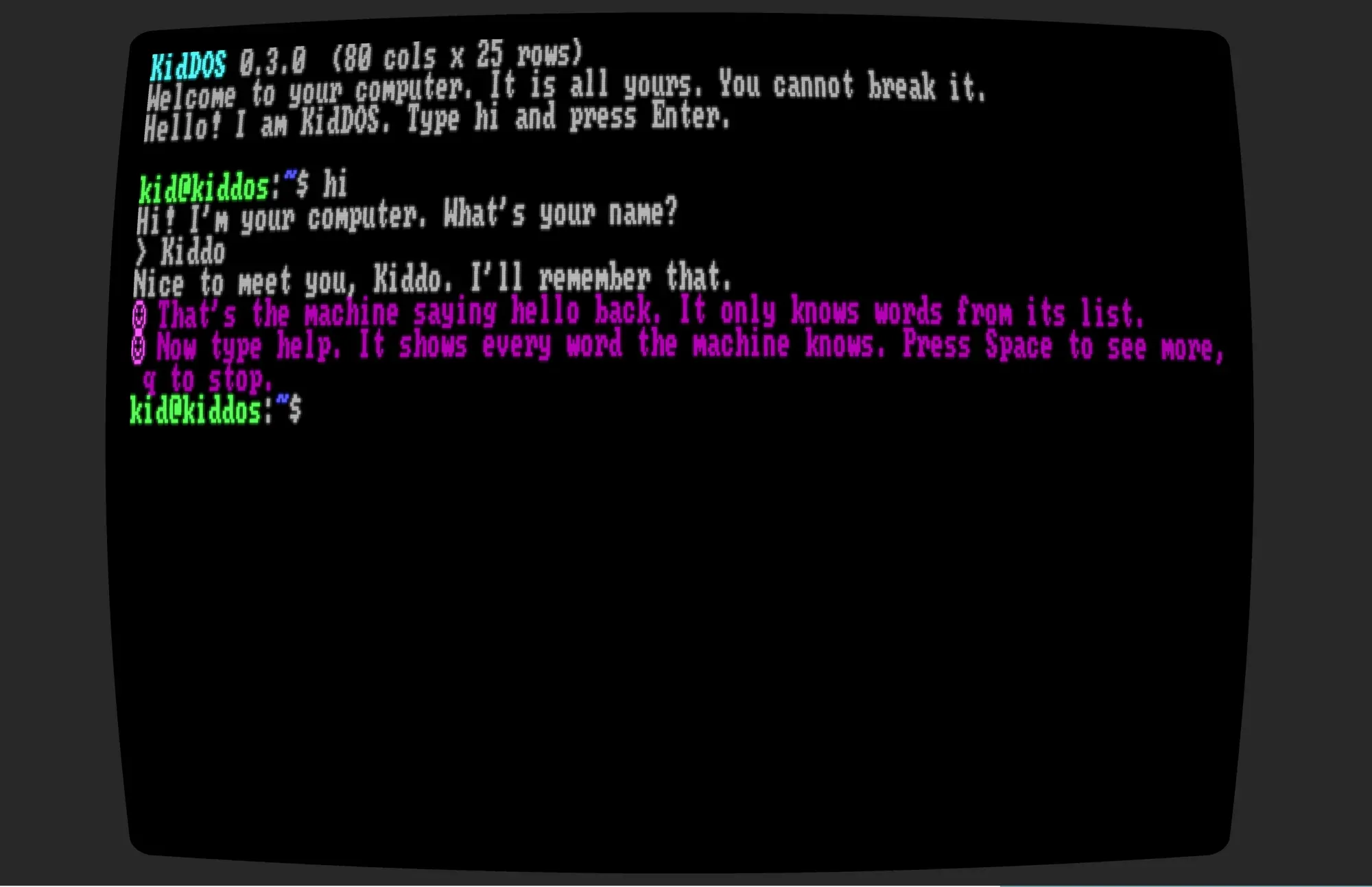
Underneath, it’s a real Unix-style shell. ls, cd, cat, mkdir, rm, pipes, redirects, man. Not DOS commands, even though I’m calling it KidDOS — I want the muscle memory to transfer. A kid who spends a year in KidDOS should be able to open a real terminal and feel at home.
It has its own virtual hard drive. The kid can rm -rf the whole thing and the only consequence is a lesson. Reset is one button in parent mode. The family laptop is never at risk, because KidDOS never touches the family laptop — everything the kid sees is simulated, and the only bridge to the real OS is a tiny whitelist: say text out loud, beep, tell the time.
And yes, echo "I am a robot" > /dev/speaker makes the computer talk. That one line will keep a seven-year-old busy for an hour. That’s the hook.
It grows with the kid
This is the part I’m most excited about.
A seven-year-old gets the shell and a text adventure where rooms are folders and items are files. He learns cd and cat without knowing he’s learning anything.
A nine-year-old gets BASIC. PRINT, INPUT, FOR. The games on the machine — Snake, Tetris, a number-guessing game — are written in BASIC, and the source is right there. cat snake.bas. Change the speed. Change the color. Break it. Fix it. Every game is a listing you can steal from, the way we all stole from the listings in the back of magazines.
An eleven-year-old gets cc. Real C, compiled to WebAssembly and run in a sandbox, so a while(1) doesn’t hang the machine and a bad pointer doesn’t crash anything but the kid’s own program. Go and Pascal the same way.
A thirteen-year-old gets something that looks like assembly. A tiny fake CPU with a handful of registers and a memory viewer, so “what is a computer actually doing” stops being a mystery.
And if the kid is that smart, that curious, that done with the sandbox — there’s a door. A way to break out of KidDOS into the real operating system. Earned, not given. Because at that point, the real thing is exactly what they should be exploring, and they’ll know how.
vi isn’t even installed at the start. You unlock it by beating a game that teaches you hjkl as movement spells. I think that’s the best idea in the whole design and I want to see a kid’s face when /bin/vi appears.
Why not just give them a Raspberry Pi with Linux?
Because I tried the equivalent, and it doesn’t work. A real OS has too many exits. The kid finds the browser in ten minutes. The file system has ten thousand files that mean nothing. The error messages are written for sysadmins. There’s no one inside the machine saying “you made a folder! now go inside it.”
KidDOS is small on purpose. Every file in it was put there by a person with a reason, and the kid can read the reason. It’s a computer sized for a human — one human, a small one, with time on his hands.
What I’m asking you
I have a plan. Rust, a virtual file system, an embedded BASIC, wasmtime for the compiled languages, a cartridge format so games are just folders you drop in. I’ve scoped the phases.
And here’s the part I almost forgot to say: it’s not just a plan. It’s built. The first two phases are done and the code is public, right now, at github.com/nurked/kiddos. The shell, the virtual drive, the manual, twelve lessons with a tutor that watches what you type, edit, BASIC, and seven cartridges — the cave adventure, guess, snake, hangman, typing, tetris and sokoban, all in BASIC the kid can read and change. There are no installers yet, so you need Rust on your machine, and then it’s one line:
git clone https://github.com/nurked/kiddos
cd kiddos
cargo run --release -p kiddos
Type hi. That’s it. You’re in.
I owe you an apology up front, though: a lot of that repo was written with AI. It’s a first, rough prototype, a proof of concept, not a finished thing. The story lines, the dialogue, the little touches that make it feel like there’s someone inside the machine — all of that needs a LOT of manual work, and I fully acknowledge it. Please read it as a sketch of the idea, not as the idea done right.
What I don’t know is whether anyone besides me wants it.
So I’m asking the people who care about teaching kids to program — the ones who learned the way I did, on a small machine with nothing to do:
Is this a good idea?
Would you put it in front of your kid?
Would you clone it, run it, and tell me what happened?
If the answer is yes, tell me. If the answer is “this exists already, it’s called X” — tell me that too, I’d rather use it than build it. And if the answer is “this is nostalgia and kids today don’t need any of this” — I’d like to hear that argument made properly, because I haven’t heard a good version of it yet.
Comments are open below — they go through GitHub.
Comments
Comments live in the project's GitHub Discussions. Sign in with GitHub below, or open the discussion on GitHub.